
Released:
- HITMAPS™ Tournaments: 2021-10-21 12:00 AM
- HITMAPS™ Roulette: 2021-10-22 12:30 AM
Major updates for the HITMAPS Roulette and HITMAPS Tournaments Websites have been released! See the most notable changes, as well as the full list of changes. Note: Most users will not see most of the changes; however it is still worth sharing it here so everyone can see what goes on behind-the-scenes during Roulette Rivals tournaments.
HITMAPS™ Tournaments Changes
Random Map Selections
The previous release of HITMAPS Tournaments supported the addition of arbitrary map picks / bans, but random maps could not be handled (with the exception of deciders). With this release, a “random map” can be added. This random map will be added to the list of maps used during a roulette match, and will be hidden from players until the time has come to play it.

Additional HITMAPS™ Tournaments Changes
- When scheduling a match, a “points for victory” option is now available. This controls when the roulette should stop providing spins and recommend to push results to Challonge. In addition, this feature is planned for future improvement where “Random Maps” can be added as needed to ensure enough maps are played during a match.
- Deciders are no longer selected during the scheduling phase (“random” maps are still pre-determined) due to the planned changes to the decider process in 2021’s RRWC. This will be fleshed out in a future release.
HITMAPS™ Roulette Changes
Improved Mobile Layout
The mobile layout has gotten some much-needed TLC. If a map has 4 or 5 targets, conditions will be reconfigured into a 2-column layout, allowing more conditions to be displayed at one time

You’ve also probably noticed the new “DONE” button. It’s been enlarged to be more obvious to players. The score strip has also been reduced to be smaller, and now lives directly underneath the roulette header.
This new mobile view will be piloted during RRWC before being copied over to the basic tournament mode read-only spin page.
Admin to Player Communication
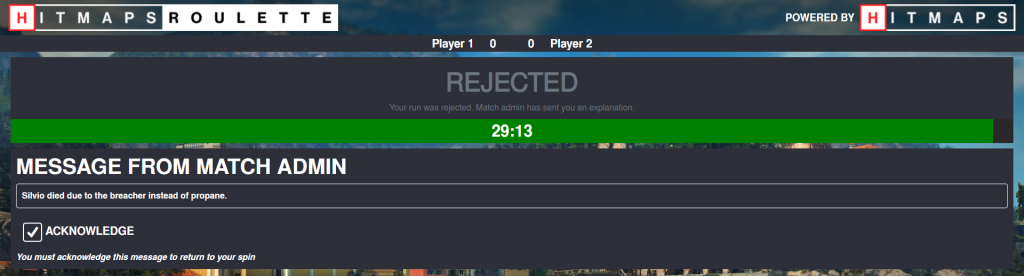
One of the most highly-voted features from the RR6 survey was a way for the match admin to communicate to the player directly via the spin page. This has been implemented and will be usable during RRWC.
Admins now have a new button on their panel to start the messaging process. Clicking “Send Message to Participant” will display a modal for them to enter and send their message. If an admin is rejecting a spin, they will be required to send a message explaining why the spin is rejected.

Once the message is sent, the spin will be hidden from the player, and the message will be displayed instead. Players must acknowledge that they have read the message before being able to see the spin again. In addition, admins can only send 1 message, and it must be acknowledged before they can send another.
Spin Link Settings
Participants can now control a couple small settings on their spin link page. These settings are:
- The volume of the announcer (aka “Fake Diana”)
- Whether or not to show the background of the current mission, or to always use the default HITMAN 3 background.
These settings are stored on a per-device basis for one year.

Other Changes
- Fixed issue where the RNG decider overlay would get stuck if the real map was first in the list
- Changed default match length from 1 hour to 30 minutes
- “Potential Photo Finish” alert now shows up if the time difference is within 47 seconds